
 UNIVLABS
AXIS CaseStudio · Surgical Case Workspace
Your Surgical Cases. One Intelligent Workspace.
Your surgical experience. One intelligent workspace.
AXIS CaseStudio turns surgical recordings and photographs scattered across computers, folders and drives into an organized, searchable case library. Find the moment you need, annotate it, and prepare the right copy for the right purpose, while the original recording stays protected.
| Availability: | Request Demo |
|---|---|
| Type: | Application |
| For: | Surgeons & clinicians |
From scattered recordings to a searchable case library
Overview
Problems it addresses
- Valuable knowledge, scattered files. Surgical videos and photographs sit across computers, folders, USB and external drives.
- The right moment is hard to find. Locating one anatomical view in a long recording can take longer than the procedure step itself.
- One recording, many purposes. Personal reference, patient communication, teaching and research each need a different, controlled copy.
Who it is for
- Surgeons building a personal case library
- Faculty preparing teaching material
- Clinicians preparing case presentations and discussions
Key capabilities
Request a demo to see these capabilities and discuss what your institution needs.
| Capability | Description |
|---|---|
| Case organization | Media is grouped by surgical case, with specialty, procedure and date. AI-suggested categories are confirmed by the clinician. |
| Clinical media library | Import from selected computer folders, USB and external drives, approved network locations or manual upload. Only the sources you select are scanned. |
| Video review | Review a recording by surgical phase, place event markers and jump straight to any marked moment. |
| Notes and metadata | Add notes, voice notes and on-screen annotations such as arrows, circles, boxes and labels. |
| Controlled sharing and export | Share an approved copy, never the original, with authorized colleagues, with view-only access and comments kept with the case. |
| Optional assisted editing | Ask AI to find moments across your cases and help prepare edited copies. AI results are candidates for your review, where the capability is enabled. |
How AXIS CaseStudio works
Import from approved sources
Bring in videos and photographs from selected computer folders, USB and external drives, approved network locations or manual upload.
Organize by case
Media is organized by surgical case, specialty, procedure and date. AI can suggest categories; you confirm them.
Ask AI to find the moment
Type a request such as “Find clips showing gallbladder anatomy.” CaseStudio lists candidate moments with timestamps. Choose one, such as 00:12:48, and the recording opens at that moment.
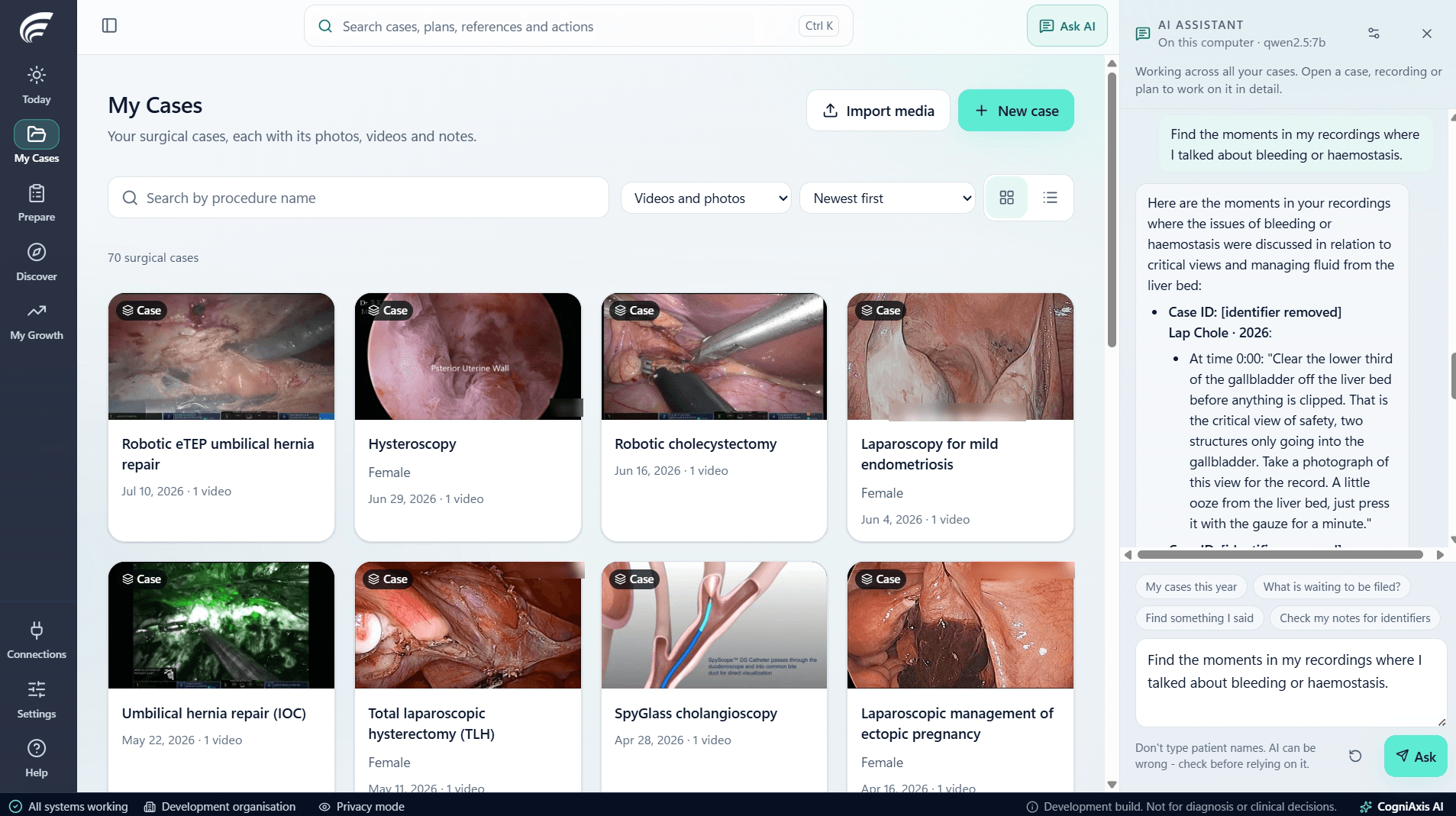
Ask AI: the assistant runs on this computer and finds moments across all your cases. Review, mark and annotate
Mark the surgical phases and steps, place event markers, add notes and voice notes, and draw on the frame.
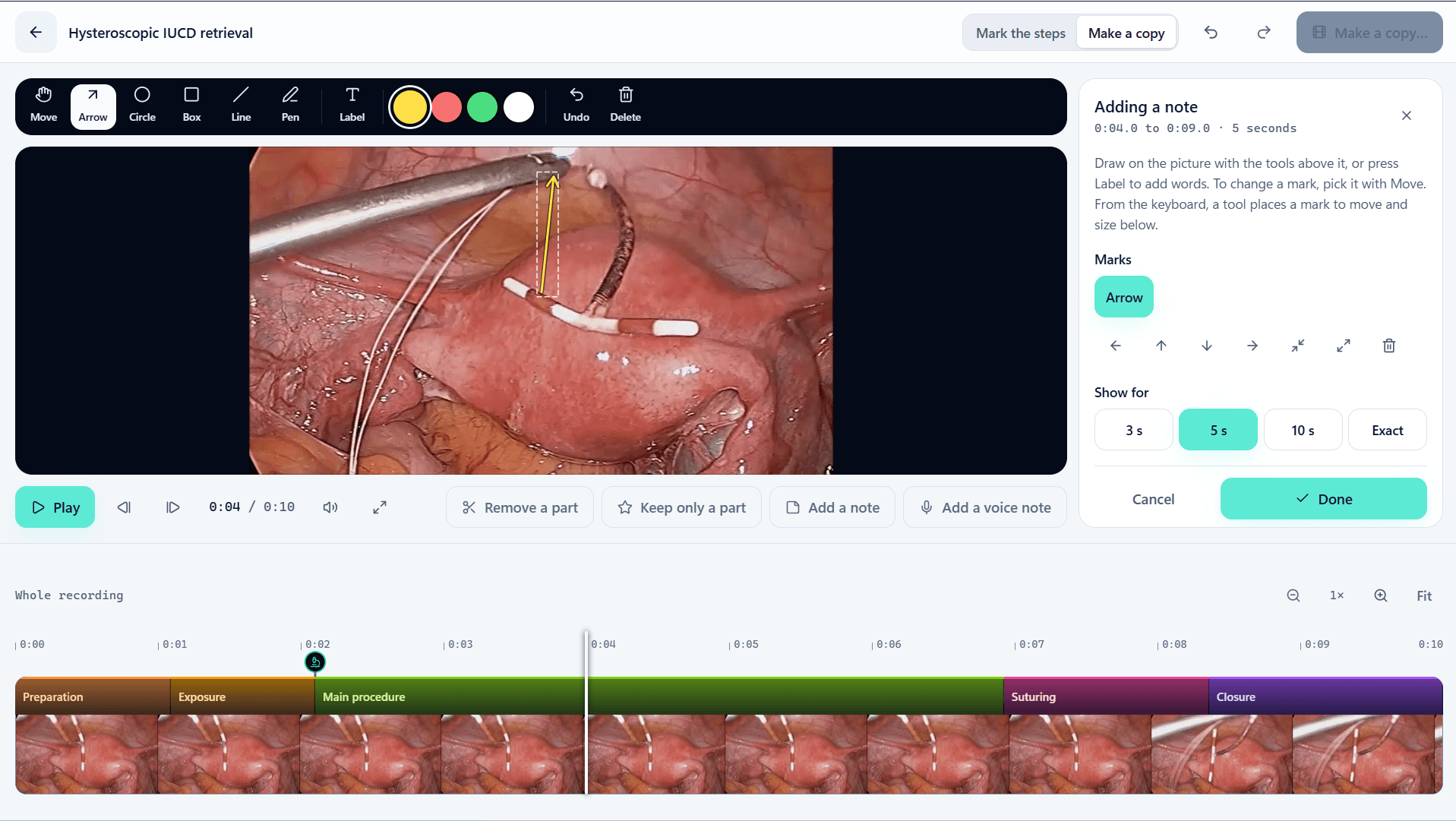
Annotate: draw on the frame and choose how long the note shows. The timeline is marked by surgical phase. Edit purpose-specific copies
Remove a part or keep only a part, then make a separate copy for personal reference, patient communication, teaching or research. The original recording is not changed.
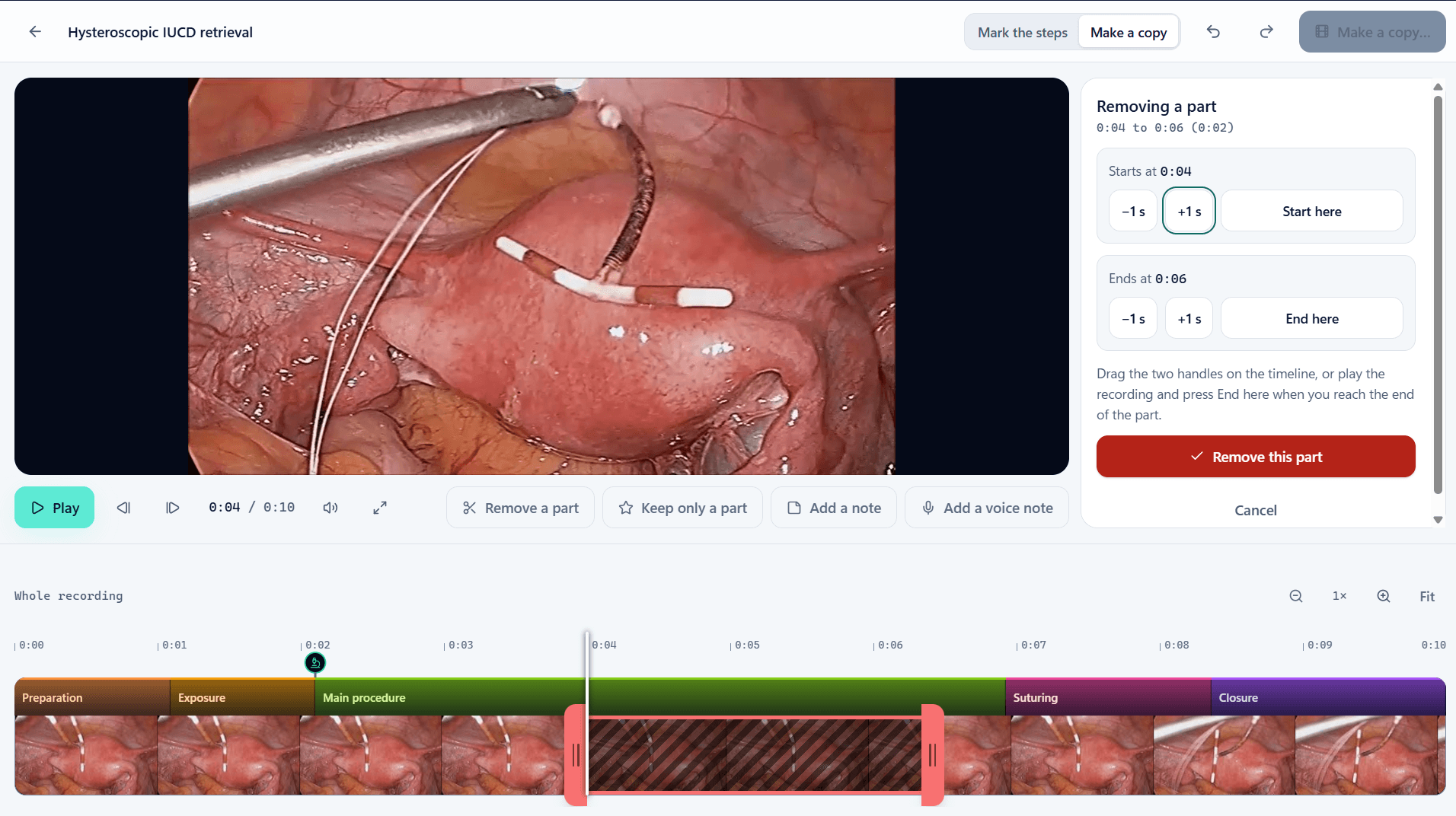
Edit: remove a part or keep only a part, then make a copy. The original recording is not changed. Share and discuss
Share an authorized copy with colleagues and start a clinical discussion, with permissions and comments kept with the case.
Applications
- Personal case library: Keep every procedure organized, searchable and ready to revisit.
- Teaching and conferences: Prepare annotated teaching copies and short clips from your own cases.
- Patient communication: Prepare a plain, reviewed copy to explain a procedure, with identifiers removed.
- Case discussion: Share an approved copy with peers through AXIS SWAN.
Integration with the AXIS ecosystem
AXIS CaseStudio is designed to work with AXIS Capture for media intake, AXIS SWAN for peer discussion, AXIS Academy for teaching, AXIS SurgiVault for storage and AXIS AI for assisted tools where available.
Frequently asked questions
Does editing change the original recording?
No. Trims, notes and annotations go into separate copies. The original recording stays unchanged.
How are recordings structured?
By case, specialty and procedure, with time-based annotations organized as phases, steps, tasks and actions. This follows published surgical video consensus work (SAGES) as a design reference; it is not a certification or endorsement.
Where does the AI assistant run?
The assistant shown runs on the clinician's own computer. Deployment options and model choices are confirmed per installation.
Is AXIS CaseStudio a desktop or web application?
Delivery format and platform support are being confirmed. Contact our team for current scope.
Related AXIS offerings
AXIS Capture
Clinical Media Capture
Mobile clinical photo and video capture with case organization and controlled transfer to supported CogniAxis workflows.
AXIS SWAN
Surgeon Associate Network
A professional community designed to bring surgeons together for meaningful collaboration, case discussions, specialty communities and continuous learning.
AXIS Academy
Surgical Education
Turn valuable surgical experiences into lasting learning: authorized surgical video, faculty-led teaching and structured educational collections for medical colleges, residents and surgeons.
AXIS AI
Clinical & Surgical Intelligence
Evolving AI-assisted capabilities across MediaAxis, SurgAxis and OR Axis, with release- and use-case-specific validation.
Talk to us about AXIS CaseStudio
Tell us about your institution and goals. Please do not include any patient information.